Complete Builder System

Why you build matters just as much as how you build.

Builder Pack

AI didn't just help me create more. It changed how I think.

It helped me hear my own voice clearer. Helped me refine ideas faster. Helped me stop overthinking every step before I moved.

But more than anything, it removed the feeling of being stuck. The gap between what I imagined and what I could actually put out started to close.

I didn't need permission. I didn't need perfect tools. I just needed a way to move from idea to something real without losing the intention behind it.

Builder Pack comes from that shift.

Not more output. Not more prompts. A way of working that lets you think clearly, move faster, and actually finish what you start — without resetting every time the tools change.

See the thinking in motion → Explore the Archive

Main starting point inside LNUniverse → First Day In is included

First Day In proves you can create something. Builder Pack helps you keep doing it.

Includes First Day In, One Shot Systems, Visual System, Text Generator, cross-tool workflows, and deeper written guidance.

Most people stay here longer than they realize

The shift

The Old Way
  • - ask
  • - hope
  • - retry
  • - restart
The New Way
  • - define
  • - direct
  • - move
  • - build

What this is

Not another prompt pack

This is not a collection of random prompts, vague inspiration, or templates that fall apart the moment you try to make them your own.

A better way to build

This is about clearer thinking, stronger direction, and a way of working that actually holds once the first spark wears off.

What’s included

Phase 01

First Day In

The entry point. A guided 3-day path to clarify a scattered idea, shape it, and make your first real output.

Phase 02

One Shot Systems

A clearer way to direct. Learn how to compress intent and ask for what you actually mean without endless back and forth.

Phase 03

Visual System

Where the visual side gets sharper. Turn ideas into cleaner direction and outputs that stay consistent across tools.

Phase 04

Text Generator

Where the language gets cleaner. Build sharper writing, clearer messaging, and reusable text without losing your tone.

How it comes together

Builder Workflow Guide

A grounded guide for moving between ChatGPT, Gemini, and Claude based on what each one handles best.

The deeper read

Builder Notes PDF

A written breakdown of how better patterns form, what actually makes outputs stick, and how to build in a way that compounds.

Research Layer

Working with GPT

Use GPT as a research and thinking layer — not just a generator. Extract clearer insight, test direction, and build with context so your decisions aren't based on guesswork.

How it works

Idea Shape Output Place Refine Return

You do not stay inside one chat.

You make pieces. You move them into the right place. You work across tools with more intention. You build in a way you can come back to.

What this actually looks like

Real proof from the way the work moves. Clearer direction, visible output, and something you can return to.
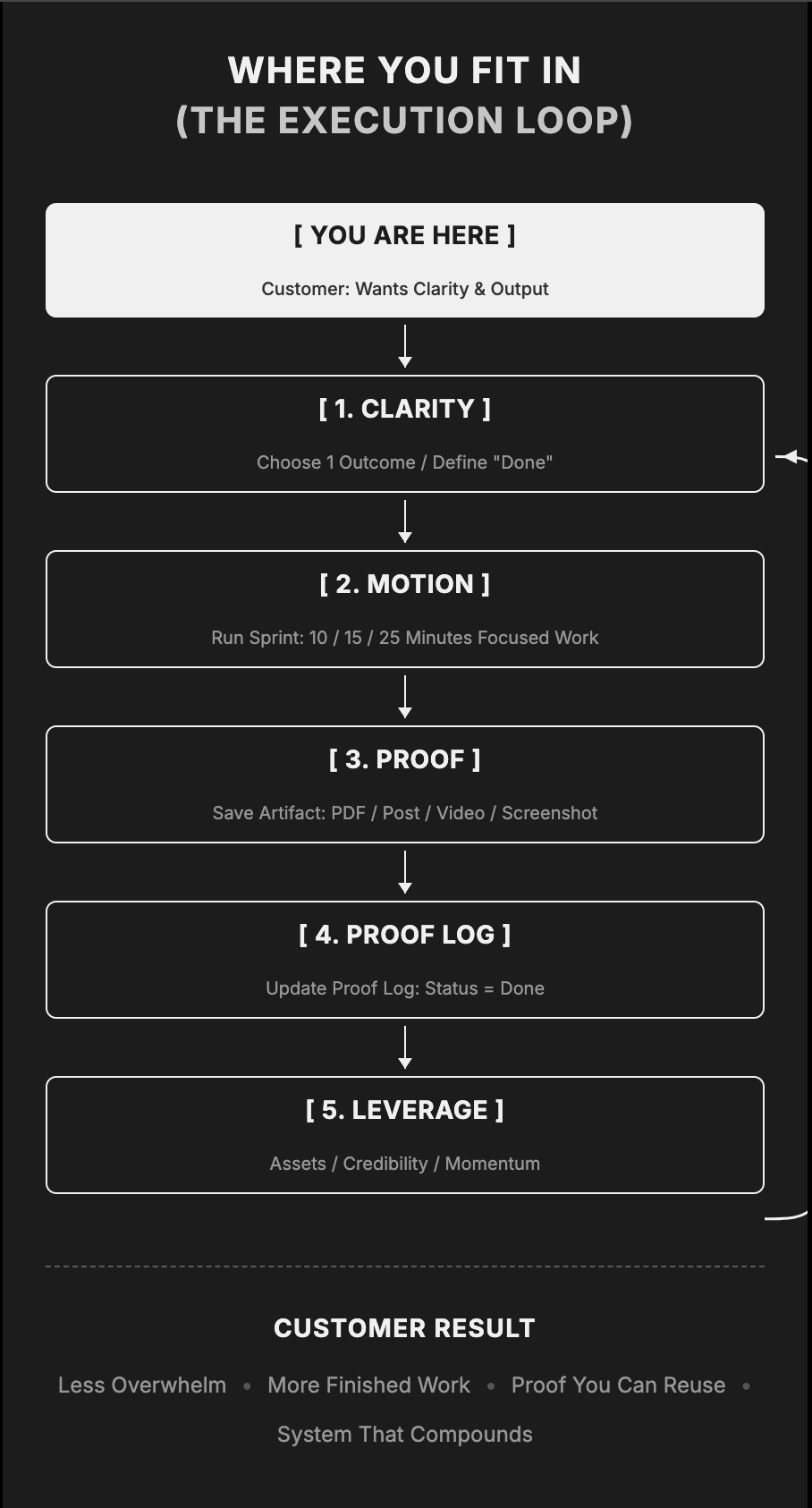
Where you fit in the execution loop

Where you fit in

A clearer picture of what the process actually is, where you start, and how finished work turns into momentum.

From prompt to something real

A direct look at a compressed prompt turning into something real instead of staying inside the chat.

From file to finished piece

A notion file moving into a hoodie loop so you can feel the jump from raw material to something people can actually see.

Who this is for

01. Beginners

Want their first real result.

You know AI matters, but you have not turned the noise into a usable personal rhythm yet.

02. Creators & Builders

Want cleaner follow-through.

You are already making things, but you want less friction between having an idea and finishing it well.

03. Brands & Teams

Want a steadier way of working.

You want tone, output, and direction to feel more consistent without collapsing into generic AI language.

Why this feels different

Anywhere Access

Built for real workflows

The best ways of working do not require a desktop monitor. Builder Pack shows you how to move and build directly from your phone.

  • Ask for a clean text block
  • Paste it into the tool you are using
  • Return for refinement when needed
  • Move between apps with intention

I stopped waiting for the perfect setup.

I built a way to move anyway.

This is the system that came out of that. If you're tired of starting over, this is where things begin to hold.

Enter Builder Pack

Build once. Refine often. Keep what works.